
Golf Simulator Lighting: The Most Overlooked Part of a Great Build

When people start planning a golf simulator, they usually focus on the launch monitor, projector, software, and screen. Those are all important decisions, but there is one factor that can make or break the entire experience regardless of how much money you spend on equipment:

Lighting.
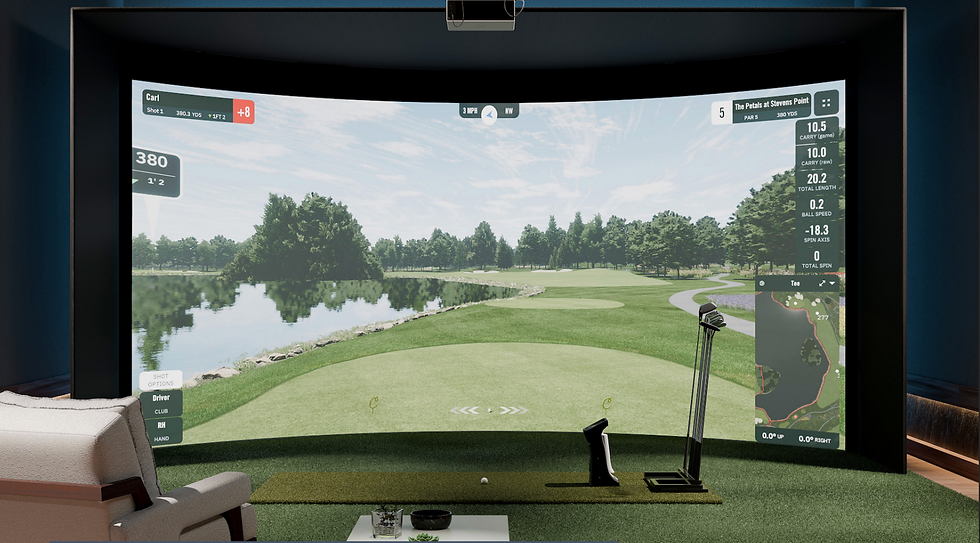
At Birdie Builds, we often tell clients that even the best projector in the world cannot overcome poor lighting conditions. If you cannot control ambient light in the room, your image will look washed out, faded, and lack the vibrant colors and contrast that make modern simulator software look incredible.
Many golfers assume they'll primarily use their simulator at night or rely on Western Washington's frequent gray skies. In reality, you'll want to use your simulator whenever you have free time—including bright afternoons and sunny weekends. That's why lighting should be a key consideration from the very beginning of the design process. Proper lighting design not only improves image quality and immersion but also ensures your simulator performs at its best no matter the time of day.
Our Three-Step Approach to Golf Simulator Lighting
Every simulator build we design follows the same lighting philosophy. The goal is simple:
Keep the screen area as dark as possible while maintaining comfortable lighting throughout the rest of the room.
1. Control Outside Light
The first step is blocking as much natural light as possible.
Windows can quickly destroy projector image quality by reducing contrast and washing out colors on the impact screen. Even a high-end 4K projector will struggle if sunlight is pouring into the room.
For most installations, we recommend:
Blackout shades
Blackout curtains
Window coverings designed specifically for media rooms
Strategic room layouts that minimize direct sunlight exposure
The more ambient light you can eliminate before it reaches the screen, the better your simulator will look during the day.
2. Eliminate Lighting Near the Screen
The second step is often overlooked but has a huge impact on image quality.
Any ceiling lights located within approximately six feet of the impact screen create unwanted glare and significantly reduce perceived contrast.
During our custom builds, we typically:
Remove bulbs from fixtures near the screen
Disconnect unnecessary lighting circuits
Pad over existing fixtures when possible
Build custom wall and ceiling padding around fixtures if the homeowner prefers to keep them accessible
The screen area should be treated like a movie theater screen. The darker the environment surrounding the image, the more vivid and immersive the picture becomes.
3. Add Functional Lighting Behind the Hitting Area
Many people think a simulator room needs to be completely dark.
We disagree.
Nobody wants to spend hours golfing in a pitch-black room with a single spotlight shining on the golf ball. While that setup may help a lower-brightness projector perform better, it doesn't create a premium experience.
Instead, we focus on adding comfortable lighting throughout the remainder of the room, especially:
Around the hitting mat
Behind the hitting area
Lounge and seating areas
Entryways and walkways
Club storage areas
This allows you to enjoy the room, socialize with friends, watch sports, and move around comfortably while still maintaining excellent image quality on the screen.
Finding the Perfect Balance
The best golf simulator rooms strike a balance between darkness and usability.
You want:
A dark screen environment for maximum projector performance
Comfortable lighting throughout the rest of the room
Visibility for guests and spectators
An inviting atmosphere for everyday use
When designed correctly, you get the best of both worlds: a bright, vibrant simulator image and a room that still feels welcoming and functional.
Final Thoughts
Lighting is one of the most underrated aspects of golf simulator design, and it's also one of the most common sources of regret after a build is completed.
At Birdie Builds, we evaluate lighting as part of every project because we know that projector performance depends just as much on the room environment as the projector itself.
Whether you're building a simulator in a garage, bonus room, basement, office, or dedicated golf shed, a thoughtful lighting plan can dramatically improve your overall experience.
If you're planning a golf simulator and want help designing the perfect space, reach out to Birdie Builds and come visit our showroom just 25 minutes from Bellevue. We'll help you create a room that not only performs at a high level but also looks incredible every time you tee it up.


Comments